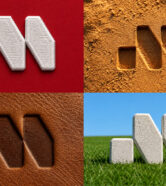


How to Use This Vault
1. Keep the Core Anchor: Every prompt in this vault uses an identical base structure
(the “core anchor text”). This ensures your logo or subject stays exactly the same size
and in the exact same position for every single generation.
2. Swap the Subject (Optional): If you aren’t using a logo consisting of “two separate
thick, L-shaped angular brackets…”, simply replace that specific descriptive text in
the first paragraph with a description of your own logo, object, or character.
3. Generate & Cut: Generate your images using Midjourney, DALL-E 3, Nano banana 2
or your AI tool of choice. Throw them into CapCut or Premiere, line up the frames
precisely, and cut them every 5 to 10 frames to the beat of the music!
Here you can see the Master Template that I used to generate all the following prompts:
The Master Template: > [Core Anchor Text Describing Your Logo/Object].
[MATERIAL & TEXTURE]. [BACKGROUND]. [LIGHTING & COLOR], clean focus,
macro photography detail, sharp texture rendering, photorealistic.
The Prompts
1. Ancient Petroglyph Carving
A studio product photograph of a modern minimalist logo emblem, precisely centered and
significantly reduced in scale to occupy roughly 5% of the frame area, surrounded by ample
negative space. The emblem is rendered as a tangible, 3D physical object with clean,
rounded geometry, matching the structural shapes in the reference image: consisting of two
separate thick, L-shaped angular brackets framing a central solid sphere and a diagonal
arrow pointing toward the top right.
[MATERIAL & TEXTURE] Deeply hand-carved as an ancient petroglyph into a sheer rock cliff
face, displaying fractured stone recesses, jagged chisel marks, and centuries-old
weathering.
[BACKGROUND] A massive, vertical sedimentary canyon wall featuring vertical cracks, rough
fissures, and layered geological rock strata.
[LIGHTING & COLOR] Illuminated by dramatic, warm late-afternoon side-lighting. Earthy
desert color palette of warm ochre, rustic orange, tan stone, and deep cool grey shadow
tones, clean focus, macro photography detail, sharp texture rendering, photorealistic.
3. Consider Frame and Cushion Quality
A quality sofa starts with a solid frame. Look for kiln-dried hardwood for strength and longevity. For cushions, high-resiliency foam wrapped in down or a polyester blend ensures both comfort and durability. Don’t be fooled by ultra-plush cushions that sag over time.
3. Consider Frame and Cushion Quality
A quality sofa starts with a solid frame. Look for kiln-dried hardwood for strength and longevity. For cushions, high-resiliency foam wrapped in down or a polyester blend ensures both comfort and durability. Don’t be fooled by ultra-plush cushions that sag over time.
Pro-Tips for Perfect Match Cuts
● Aspect Ratio: Make sure to append your AI image generation commands with –ar 9:16 if using Midjourney, or set your dimensions to 1080×1920 to fit full-screen vertical video formats perfectly.
● Consistency: If the details shift too much between iterations, try utilizing your first generation as an image-to-image or character reference in subsequent prompts to lock down the foundational geometry.